
5 tools to create engaging content
5 tools to create engaging content
Creating engaging content is a challenge for many SMEs in Switzerland, often limited by time and resources. Fortunately, simple and cost-effective tools can transform your online presence. Here are the top 5:
- Canva: Ideal for designing professional visuals without graphic design skills. Compatible with social networks and equipped with ready-to-use templates.
- CapCut: Mobile app for creating short and dynamic videos, perfect for TikTok, Instagram Reels, or YouTube Shorts.
- Pexels: Free platform offering quality images and videos to enhance your posts.
- Adobe Express: All-in-one solution for creating graphics, short videos, and web pages tailored to social networks.
- Buffer: Tool for scheduling and analyzing your posts on multiple platforms.
These tools allow businesses to produce impactful visual and video content while optimizing their time and budget. You can combine them for an effective strategy: create visuals with Canva or Adobe Express, edit videos with CapCut, enhance your content with Pexels, and schedule everything via Buffer. Result: professional and engaging communication, even with limited resources.
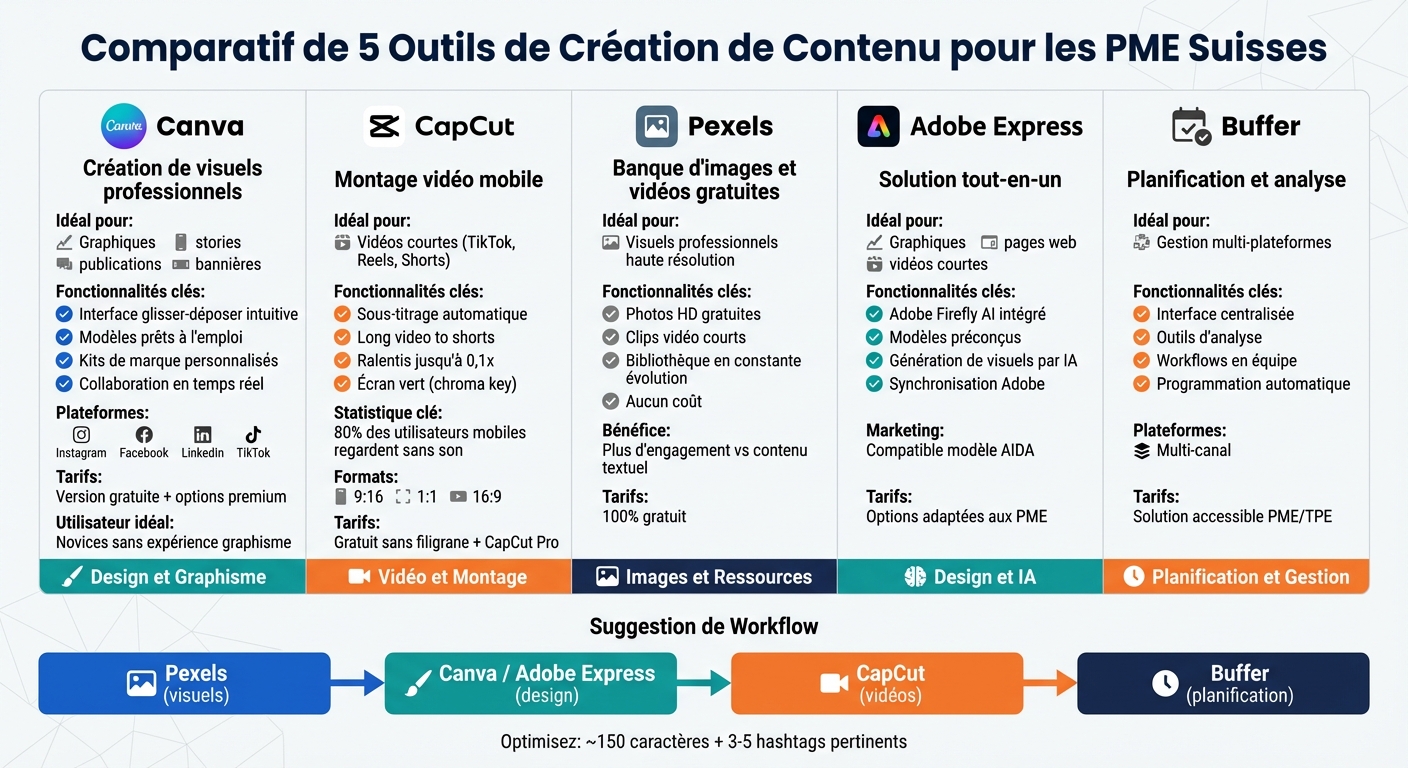
Comparison of the top 5 content creation tools for SMEs
The best content creation tools for Community Managers!
1. Canva
Canva is an essential tool for creating professional-quality visuals, even without graphic design experience [5]. With its intuitive features, social media compatibility, and affordability, Canva stands out as an ideal solution for SMEs.
A platform designed for beginners
Canva was designed to simplify graphic design, even for those who have never used a design software [5]. Its intuitive "drag-and-drop" interface allows easy integration of elements like graphics, text, photos, or animations [5]. With a library of ready-to-use templates, users can quickly produce posts, stories, banners, or reels. Additionally, teams can collaborate in real-time on projects, speeding up validation and publishing [5].
Tools for attention-grabbing content
Canva offers a wide range of free elements, including photos, icons, and graphics [2]. Companies can also create custom brand kits, defining specific colors and fonts to ensure visual consistency across all their platforms [2]. Built-in animation options add a dynamic touch to visuals, ideal for catching the eye on social media [5].
Optimized compatibility for social networks
Canva simplifies social media posting with pre-sized templates for Instagram, Facebook, LinkedIn, or TikTok. This avoids cropping or misalignment issues with visuals [5]. Furthermore, integration with tools like Hootsuite allows designing, editing, and publishing creations directly from the dashboard, without wasting time downloading or reloading files [2]. This level of synchronization optimizes workflow.
An economical solution for small businesses
With its free version, Canva provides access to thousands of resources, eliminating the need to invest in expensive image banks [2]. This accessibility, combined with quick creation, allows small businesses to maintain a professional visual presence without significant expenses.
2. CapCut
CapCut is a mobile video editing app designed to create short and dynamic content, ideal for SMEs looking to produce engaging videos for TikTok, Instagram Reels, or YouTube Shorts [5]. Let's see how its simplified tools meet the needs of small businesses.
An interface designed to simplify editing
CapCut's interface is intuitive, making editing accessible even to those without prior experience. It allows adding transitions, music, and special effects in a few clicks [5]. With its library of templates categorized by themes, businesses can quickly choose a format aligned with their brand image [2]. Automated tools, such as adding subtitles or applying filters, speed up the creation process [5].
Tools for captivating videos
CapCut offers advanced functions like keyframe animation, green screen (chroma key), and background removal. It also includes speed curves for smooth slow-motion down to 0.1x [6][9]. A particularly useful feature, "Long video to shorts," automatically identifies and extracts key moments from a long video to transform them into clips suitable for social media [7]. With 80% of mobile users watching videos without sound [8], the automatic subtitle function becomes essential to capture attention and encourage viewers to stop and watch a video.
Perfect compatibility with social networks
CapCut supports major image formats (9:16, 1:1, 16:9) and allows direct sharing to TikTok and YouTube with a single click [6][8][9]. This native compatibility avoids tedious adjustments and ensures that videos meet the specific requirements of each platform [5].
An affordable solution for SMEs
The free version offers a comprehensive range of tools, including keyframe animation and background removal, all without watermarks or hidden fees [6]. For businesses with more advanced needs, CapCut Pro adds premium features like precise cuts, additional titles, and an exclusive music library [6]. This accessibility allows SMEs to regularly produce quality content without investing in expensive software.
3. Pexels
Pexels is a platform that provides free images and videos, offering SMEs a valuable source of professional visuals. Posts incorporating images or videos consistently generate more engagement in the form of clicks, shares, or comments, compared to purely textual content [4]. Here's why Pexels is an interesting option for small businesses.
An advantageous solution for tight budgets
When every penny counts, SMEs often need to find cost-effective alternatives to stay competitive. For those who cannot afford to hire a designer or photographer, free image banks become an essential resource. Pexels provides access to professional-quality visuals without the costs associated with custom content creation [10]. This allows businesses to regularly publish attractive visual content while managing their expenses.
Perfect visuals for social networks
Pexels offers a wide range of visual content, including high-resolution photos, text-ready images, and short video clips. These formats are ideal for social networks and can be tailored to the brand identity or target audience expectations [4]. With their impeccable quality, these visuals immediately capture attention and enhance the impact of posts.
An ever-evolving library
The Pexels collection is regularly updated, ensuring a continuous flow of new images and videos. These additions cover an impressive variety of themes, from office scenes to everyday life moments. This diversity allows businesses to find visuals perfectly suited to their needs, whether for seasonal campaigns, product presentations, or conceptual content to support their marketing messages. A valuable resource to maintain fresh and relevant campaigns.
sbb-itb-454261f
4. Adobe Express
After discovering Canva, CapCut, and Pexels, Adobe Express emerges as an all-in-one solution ideal for visually enhancing your social media campaigns.
Adobe Express (formerly Adobe Spark) offers small and medium-sized enterprises (SMEs) the ability to create graphics, short videos, and web pages tailored to social networks, thanks to customizable and intuitive templates [5].
A simple and accessible solution for SMEs
For SMEs without a dedicated creative team, Adobe Express offers pre-designed templates perfectly suited to social media requirements. These templates ensure a professional result with modern fonts and captivating animations [5].
Tools to produce engaging content
With the integration of Adobe Firefly, Adobe's generative artificial intelligence, users can generate unique visuals by simply describing what they want. For example, enter a phrase like "a young woman smiling in the street showing her smartphone screen," and get a ready-to-use visual [1]. This feature allows SMEs to produce original content while applying principles like AIDA (Attention, Interest, Desire, Action) to encourage their audience to take action