Customized chatbot: project checklist
Customized Chatbot: Project Checklist
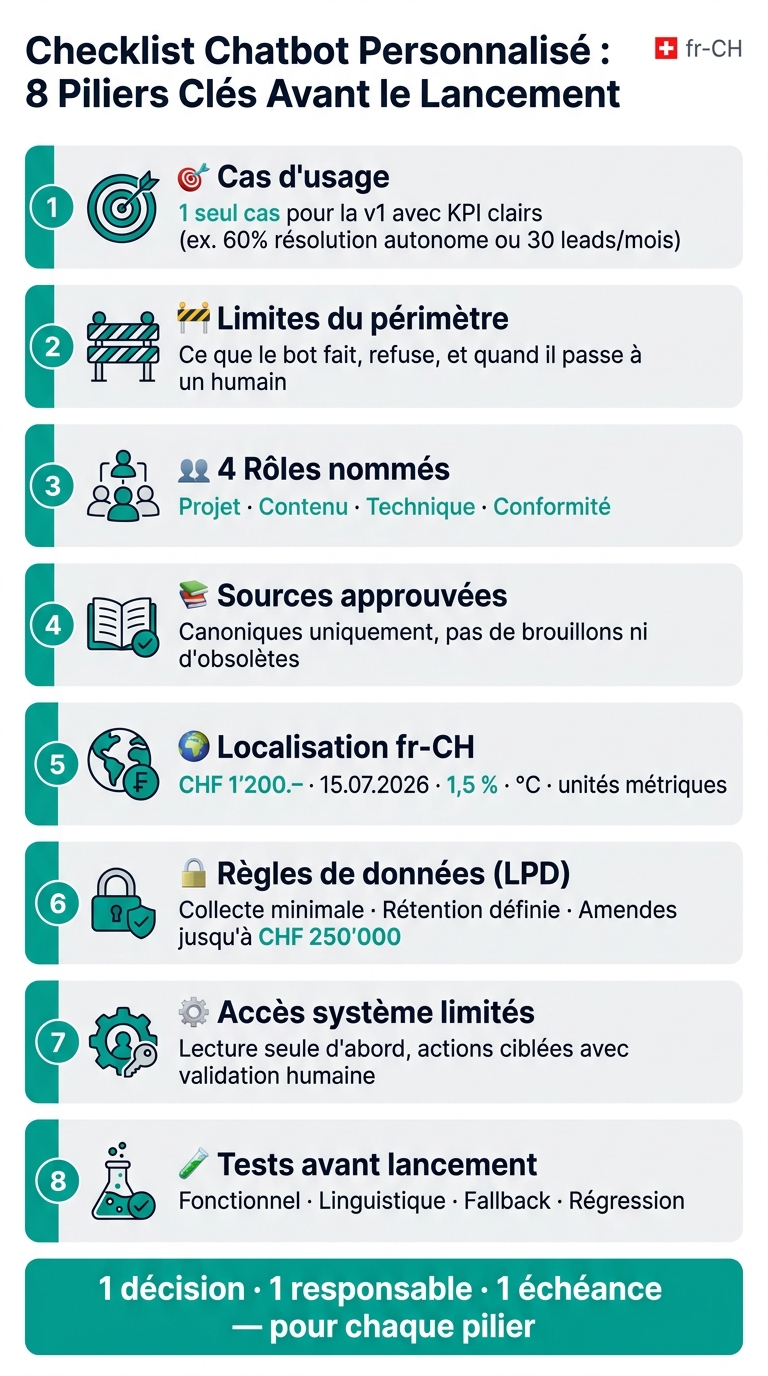
If I don't set the framework from the start, the chatbot misses its target. In practice, I must decide first of all on 8 points: use case, limits, roles, sources, languages, data rules, system access, tests, and human handover.
Here's the idea in a simple view:
- 1 with clear KPIs, for example 60% resolution without human intervention or 30 leads/month
- Written limits: what the bot can do, what it refuses, and when it transfers to a person
- 4 named roles: project, content, technical, compliance
- Approved sources only: no drafts, no outdated content
- Strict fr-CH localization: 15.07.2026, CHF 1'200.–, 1.5%, metric units, °C
- Clean data rules: minimal collection, retention period, limited access, clear info from the start
- Limited system access: initially read-only, then targeted actions with human validation if the risk is high
- Tests before going live: functional, linguistic, fallback, regression
- Monitoring after launch: resolution, escalation, fallback, CSAT, response time
- Structured manual takeover with SLA, context summary, and language routing
I also note a simple point: in Switzerland, compliance LPD is not dealt with "later." The text reminds that in case of non-compliance, fines can go up to CHF 250,000 for certain obligations. So, if no one is named, the risk remains vague.
In short, this checklist helps me transform a chatbot idea into a work plan: one decision, one responsible person, one deadline for each topic. The following details how to set this framework without going off track.
Checklist Customized Chatbot: 8 Key Pillars Before Launch
1. Define the Scope, Objectives, and Responsibilities
Main Use Case, Business Objectives, and Success Criteria
For v1, keep one main use case. Not three. Not five. Just one. It could be reducing support requests, accessing an internal knowledge base, or multilingual guidance. Additional cases can come later, with a target date and separate KPIs.
For this objective to be meaningful, it must be measurable. For example: resolve at least 60% of FAQs without human assistance, or generate 30 qualified leads per month through the site's chatbot. [3][4][5][6]
The metrics to establish from the start vary depending on the context:
| Context | Key KPIs |
|---|---|
| Customer Support | Deflection rate, resolution rate, CSAT, first response time |
| Lead Qualification | Number of qualified leads/month, conversion rate to appointments |
| Internal Knowledge Base | Search success rate, helpdesk ticket reduction |
| Multilingual Guidance | Linguistic coverage, information access time |
Monitor these KPIs monthly for 3 to 6 months. This framework will then guide content, integrations, and tests. In short: if the objective is unclear, the chatbot will be too.
Scope Limits, Channels, and Refusal Rules
You must also clearly state, in black and white, what the chatbot will not do. Forbidden topics, rejected actions, transfer to a human: everything must be documented. The simplest way is to write a scope note with authorized topics, forbidden topics, allowed actions, and those reserved for a person.
Concrete example: a chatbot can explain general tax deadlines, but it cannot provide personalized optimization advice. It can also suggest available slots, but it cannot confirm an appointment without human validation.
For sensitive questions - legal, medical, HR, financial - establish explicit refusal rules with a pre-approved message in fr-CH and a clear escalation: direct contact, callback request, link to a specialist, with local time format, for example Mon-Fri, 08:30-17:30. Regarding channels, choose a single entry point at launch - website, client portal, or intranet - then note the criteria for further steps. These limits serve as the basis for sources, refusals, and tests.
Project Manager, Content Manager, Technical Manager, and Compliance Manager
A chatbot project without a clear owner often ends up going off track. Before even starting development, four roles must be named:
| Role | Main Responsibility |
|---|---|
| Project Manager | Objectives, budget (CHF), schedule, scope arbitrations |
| Content Manager | Approved sources, scripts, fr-CH localization, updates |
| Technical Manager | Integrations, environments, security, incidents |
| Compliance Manager | LPD/GDPR, consent, data retention, AIPD |
These roles intersect at every critical decision: adding a new flow, integrating an external system, changing the consent text, opening a new language. Document the responsibilities to avoid gray areas.
In Switzerland, the Federal Act on Data Protection (LPD) revised may provide for fines of up to CHF 250,000 in case of breach of information, diligence, and security obligations. [1][2] Simply put: a person must be clearly designated for compliance.
Once these roles are named, the audit of sources and data can begin.
sbb-itb-454261f
How to Create an AI Chatbot that Qualifies Your Prospects in Less Than 15 Minutes (Typebot and Mistral)
2. Audit Content, Data Sources, Languages, and Compliance
After framing the project, clearly define what feeds the chatbot: sources, languages, and data.
Approved Sources, Canonical Content, and Update Workflows
Before indexing, take inventory of all sources that can feed the chatbot: site pages, help center articles, PDFs, CRM data, product documentation, internal policies, and structured databases. For each source, note the owner, last update date, approval status, language, and access level - public, internal, or confidential.
Then categorize each source into one of these three categories:
- canonical: approved, actively maintained, unique reference
- draft: under review, so exclude until validated
- obsolete: replaced or archived
In production, the chatbot should only query canonical sources. Once a change is validated, it should trigger a reindexing. In short: your indexing engine should only include validated content, period.
Also formalize a simple and clear update cycle: proposed modification → validation by the domain owner → compliance/legal check if needed → publication in the source → chatbot index refresh. Simultaneously set a maximum review frequency based on content type: support articles reviewed every 6 to 12 months, legal documents updated with each regulatory change, rates validated before each release.
These sources form the unique basis for chatbot content and responses. But there's a common pitfall: even well-validated sources are useless if they don't exist in the expected languages.
Supported Languages, Terminology Rules, and fr-CH Localization
Build a language × intent × content matrix to link each flow and content to the available languages. If a critical flow is missing in a target language, halt the launch. [7][10]
Then prepare a bilingual glossary with approved terms for products, roles, and legal mentions. Also include prohibited formulations and politeness rules. In Switzerland, the formal “vous” remains the norm in a B2B and institutional context.
For fr-CH localization, apply these formats without exception: CHF 1'200.–, 1.5%, 15.07.2026, metric units, local addresses. [7][10]
These rules apply not only to chatbot responses but also to information screens and consent notices. And again, no gray area: good localization is not enough if data collection and retention go off track.
Confidentiality, Consent, Retention, and Data Governance
List precisely the personal data the chatbot collects, stores, or logs: identifiers, email addresses, financial data, HR information. Apply data minimization and the security rules provided by the LPD, and GDPR if applicable. This mainly concerns the principles of proportionality, purpose limitation, and data security.
From the chatbot's launch, display a brief notice explaining who controls the data, what is logged, for what purposes, and for how long. Make a clear separation between necessary processing - service provision - and optional use, like model improvement or marketing analysis. Only this optional use requires explicit consent.
Also define different retention periods based on the risk level. For example, 3 to 12 months for raw transcripts containing personal data, and 12 to 24 months for anonymized logs. Limit access to raw transcripts to a restricted group, like the quality team, DPO, and technical operators. Finally, provide mechanisms for users to exercise their rights: access, rectification, and deletion.
For sensitive use cases - finance, HR, NGOs, medical-related areas - keep the processing of personal data in controlled internal systems. And, whenever possible, pseudonymize or anonymize chatbot logs. [9][8]
These rules should then guide access, logs, and security tests.
3. Specify Integrations, Access Rights, Tests, and Security Controls
After sources and compliance, you need to define what the chatbot can access, what it can do, and how you test it before going live. This is where rights, tests, and security safeguards come into play.
System Integrations, Read-Only Rights vs. Actions, and Human Validation Steps
Start by listing each system connected to the chatbot: CMS, CRM, ERP, booking engine, knowledge base, search layer, support tool, identity provider (SSO/IdP), analytical layer. For each connection, note three simple points: the targeted data domain, the environment involved (test or production), and the access mode, either read-only or allowed actions.
The right approach is to start with read-only access. For example: consult content in the CMS or knowledge base, read a customer profile in the CRM, or check a delivery status in the ERP. Action rights - create a lead, open a ticket, modify a booking, trigger a refund - should only come once the governance framework is well established. And in sensitive areas, any high-impact action should go through human validation.
| System | Access Mode | Example of Allowed Action | Human Approval |
|---|---|---|---|
| CMS / knowledge base |